Gmail Tips: How to Create Multiple Email Addresses in One Gmail Account


Tasia Custode
@tasiacustodeAbout
Tasia Custode shares tech tips, app reviews, and how-tos to help you navigate your digital world. Welcome to my YouTube Channel! I'm a TV host, video producer, editor, and owner of Brio Media, with nearly two decades of experience in broadcasting and digital media. Want to know how to back up and export iMessages? Curious about the latest Gmail updates? In need of the best budget apps for iOS and Android? Wondering which Mac Apps are the best? Maybe you're looking for Google Drive tips and tricks. Whatever it may be, I've got you covered. Be sure to subscribe to my channel for #TechTips, #AppReviews, and a ton of #GoogleTips!
Latest Posts



Video Description
Create multiple email addresses in one Gmail account! Subscribe to my YouTube Channel for more content like this: https://www.youtube.com/user/TasiaCustode Did you know your one and only Gmail address can actually be turned into multiple email accounts? It’s true! Signing up for services has never been easier. Hey friends, I’m Tasia Custode and I want you to get the most out of Gmail! So, in this video, I’m showing you how to create multiple email addresses from one Gmail account. Trust me, it’s so easy, you won’t believe it! Have you created multiple Gmail addresses from one Gmail account? Leave a comment below! ⏰ TIMECODES: 00:00 - Intro 00:21 - Important Info 00:42 - Plus Addressing 04:56 - Changing the domain 👀 WATCH MORE GMAIL TIPS AND TRICKS: 📹 Clear Gmail Space in 2024: https://youtu.be/Nqv3Ea1K6MU 📹 Gmail Mail Merge Tutorial: https://youtu.be/JV52t5PcvqI 📹 The Best Gmail Features: https://youtu.be/MLQoFNh0kcM 📹 Download All Emails in Gmail: https://youtu.be/Pb-w9IG7dfk 📹 Send Bulk Emails in Gmail: https://youtu.be/Z0TlSFpxSMc 📹 Setup Multiple Inboxes in Gmail: https://youtu.be/wrQiXNM2CvI 📹 How to Tell if an Email Has Been Read: https://youtu.be/c67yEsKGwgI 📹 The Best Hidden Gmail Features: https://youtu.be/_JiCKBUNazE 📹 Spend Less Time in Gmail: https://youtu.be/FAi_HAzIRXw 📹 How to Customize Your Gmail Layout: https://youtu.be/QlnGEMF3d0o 📹 Gmail Filter Tutorial: https://youtu.be/rNrCiRwMiMs 📹 How to Create Email Templates in Gmail: https://youtu.be/Y3XmYym2sNQ 📹 How to Clear Gmail Space for More Drive Storage: https://youtu.be/4yz5seVOEWk 📹 How to Remotely Sign Out of Gmail: https://youtu.be/CkXen-iuebI 📹 How to Schedule an Email in Gmail: https://youtu.be/b294HERJc5c 📹 12 Best Gmail Features: https://youtu.be/_6-1rEkariM 📷 YOUTUBE CAMERA GEAR: Panasonic GH5 Lumix Kit: https://geni.us/teLeWzz Sony ZV1 Camera & Vlogging Kit: https://geni.us/B6pj Rode VideoMic Pro+: https://geni.us/yfXsy Vanguard Alta Pro Tripod: https://geni.us/3Ougb Sony E Series SD Card: https://geni.us/BBi1Yxd Neewer Ring Light Kit: https://geni.us/3ho03WZ Neewer Desktop Ring Light: https://geni.us/quBpGZ Neewer Camera Light: https://geni.us/RyRTA ⌚️MY APPLE WATCH BAND: https://geni.us/1IMxe ✅ RECOMMENDATIONS: 🎦 I use Tubebuddy to grow my YouTube Channel. Learn more: https://www.Tubebuddy.com/tasiacustode 🖼I use Canva to create all my YouTube thumbnails. Learn more: partner.canva.com/jWXqOv 🎞 I use Camtasia for all my screencasting needs: techsmith.z6rjha.net/2rrRvG ⚙️ DOWNLOAD MY DIGITAL TOOLKIT: https://www.tasiacustode.com/digitaltoolkit 🤝 CONNECT WITH ME: 📸 Instagram - https://www.instagram.com/tasiacustode/ 👍🏻 Facebook - https://www.facebook.com/TasiaCustode 🖥 Website: http://www.tasiacustode.com/ *Some of these links are affiliate links, meaning I may make a small commission if you sign up or purchase a product using these links. Don’t worry, this is at no extra cost to you! Thank you so much! Did you find this video helpful? Have questions or comments? Leave your thoughts in the comment section below. #GmailTips #GoogleMail If you like this video, give a like, a share, or subscribe for more tech tips, social tips, and app reviews.
You May Also Like








Boost Gmail Productivity
AI-recommended products based on this video
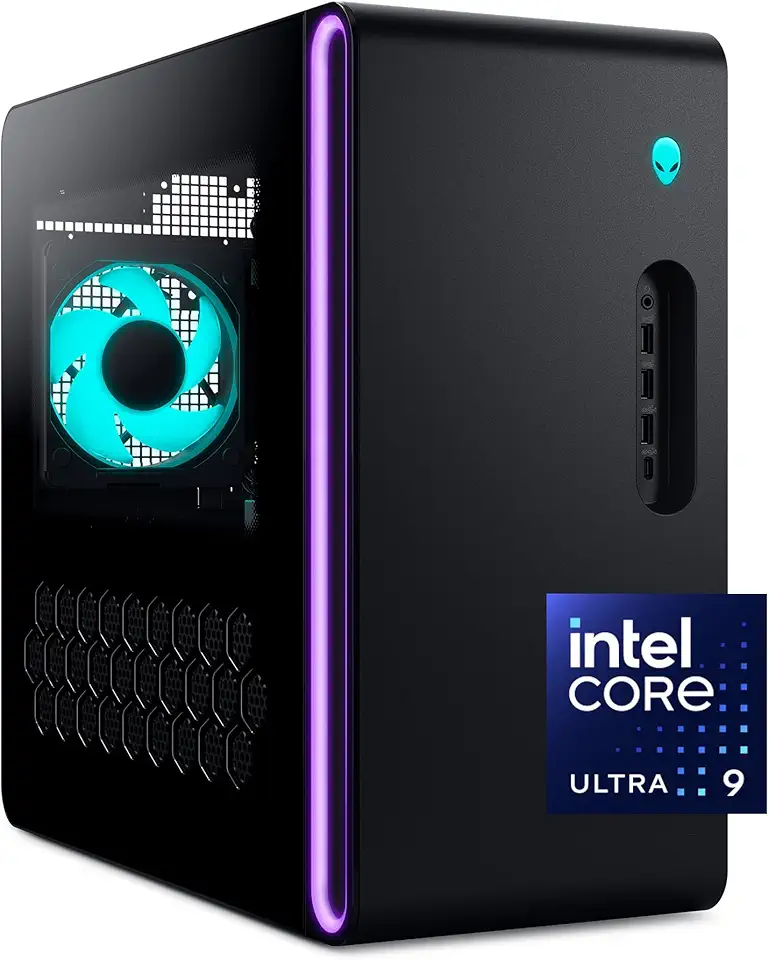
Alienware Aurora Gaming Desktop ACT1250 - Intel Core Ultra 9 285 Processor, Liquid Cooled, NVIDIA GeForce RTX 5080, 32GB DDR5 RAM, 1TB SSD, 1000W Platinum Rated PSU, Windows 11 Home - Clear Panel

Cervical Neck Pillow, Ergonomic Memory Foam Pillows for Neck Pain Relief with Breathable Pillowcase, Contour Neck Support Pillow for Side Back Stomach Sleepers, Odorless OEKO-TEX STANDARD 100

Wireless Earbuds Bluetooth 5.4 Headphones, 50H Playtime Stereo Earphones with ENC Noise Cancelling, IPX7 Waterproof Open Ear Buds with Ergonomic Earhook for Fitness/Sports/Workouts Black

AstroAI 27" Snow Brush and Detachable Ice Scraper with Ergonomic Foam Grip for Cars, Trucks, SUVs (Heavy Duty ABS, PVC Brush, Orange)