LinkedIn Tutorial For Beginners - How to Use LinkedIn In 2023 (10 EASY Tips!)


Professor Heather Austin
@professorheatheraustinAbout
Hi, I'm Heather, a former university professor turned entrepreneur, and the creator of The Career Advancement Toolkit and World-Class Career Academy. With over 20 million views on my career development YouTube channel, I’ve helped thousands of professionals confidently land job offers they’re proud of - and I’d love to help you do the same. I know firsthand how overwhelming a job search can feel - the pressure to stand out, the anxiety of interviews, and the frustration of sending applications into a black hole. But with the right strategy (and the right support), it doesn’t have to feel that way. For over 15 years, I’ve taught job seekers how to navigate career pivots, promotions, and personal reinventions - using a step-by-step system that blends personal branding, modern tools like AI, and real-world recruiter insights. I can't wait to help you make your next move your best one yet.
Latest Posts


Video Description
✅ THE CAREER ADVANCEMENT TOOLKIT FLASH OFFER 👉 https://professorheatheraustin.lpages.co/toolkit-youtube/ ✅ ATS-FRIENDLY RESUME PACK + AI-POWERED PROMPTS 👉 https://heatheraustin.online/resumepack ✅ NEW EXCLUSIVE CAREER & JOB SEARCH PODCAST 👉 https://heatheraustin.online/podcasting/ FREE LINKEDIN MINI-COURSE: https://heatheraustin.online/linkedin-liftoff/ LinkedIn is now the world’s #1 LARGEST professional network. It’s one of the only places where you can find high-quality career opportunities, build a network of like-minded professionals, and command authority in your industry. So if you are wondering how to use LinkedIn properly so you can get noticed and gain exposure or if it’s been years since you created your LinkedIn account and now you're wondering how to make the most out of the platform, tune in! In this video, you’ll learn 10 EASY LinkedIn profile tips. With how often the LinkedIn platform changes, this new tutorial will help you navigate some of LinkedIn’s newest features. Want to jump straight to the tips? Use the timestamps below: -- 00:00 Intro 01:55 LinkedIn Tip 1: Pay special attention to anything above the fold - picture, headline, background photo, about 02:38 LinkedIn Profile Picture 05:57 LinkedIn Headline 07:27 LinkedIn Background Photo 08:54 LinkedIn About Section 10:58 LinkedIn Tip 2: Use the featured section wisely 12:45 LinkedIn Tip 3: Optimize the experience section 15:16 LinkedIn Tip 4: Fill out your education and licenses section 17:58 LinkedIn Tip 5: Add a volunteer experience section 19:21 LinkedIn Tip 6: Use skills and endorsements to your benefit 21:46 LinkedIn Tip 7: Give recommendations to get recommendations 24:08 LinkedIn Tip 8: Add any other relevant accomplishments 25:00 LinkedIn Tip 9: Edit your public profile and URL 26:03 LinkedIn Tip 10: Use the open-to-work section strategically OTHER VIDEOS MENTIONED IN THIS VIDEO: https://youtu.be/0iVgvNdnyo4 https://youtu.be/r_Wf532f5X4 **WATCH NEXT** https://youtu.be/-gVviNxSTlQ https://youtu.be/K6uO-52UHTw ▀▀▀▀▀▀▀▀▀▀▀▀▀▀▀▀▀▀▀▀▀ **MY MOST POPULAR CAREER RESOURCES** **PREMIUM JOB SEARCH & CAREER COACHING PROGRAM** https://heatheraustin.online/learn **THE CAREER ADVANCEMENT TOOLKIT** https://heatheraustin.online/toolkit **PRIVATE 1:1 JOB SEARCH AND CAREER COACHING CONSULTATION** https://heatheraustin.online/coaching **ATS-FRIENDLY RESUME PACK WITH AI-POWERED PROMPTS** https://heatheraustin.online/resumepack **25 POWERFUL AI PROMPTS FOR JOB SEEKERS** https://professorheatheraustin.lpages.co/prompts/ **NEW EXCLUSIVE CAREER & JOB SEARCH PODCAST** https://heatheraustin.online/podcasting/ **FREE COMMUNITY OF PROFESSIONALS ON FACEBOOK** https://heatheraustin.online/club ▀▀▀▀▀▀▀▀▀▀▀▀▀▀▀▀▀▀▀▀▀ LET’S CONNECT ON SOCIAL! Website: https://heatheraustin.online LinkedIn: https://www.linkedin.com/in/heather-austin/ Instagram: https://www.instagram.com/professor.heather.austin/ Facebook: https://www.facebook.com/ProfessorAustin/ #LINKEDIN #LinkedInTips

![🔴 [LIVE] TOP 5 LinkedIn MISTAKES Sabotaging Your Job Search!](https://imgz.pc97.com/?width=500&fit=cover&image=https://i.ytimg.com/vi/rgPEG14tPME/hqdefault.jpg)




![🔴 [LIVE] Write the Perfect Resume to Beat the ATS: Your Guide to Exceptional Job Offers!](https://imgz.pc97.com/?width=500&fit=cover&image=https://i.ytimg.com/vi/sPE6iSMhzoQ/hqdefault.jpg)




Boost Your LinkedIn Presence Now
AI-recommended products based on this video

Logitech G203 Wired Gaming Mouse, 8,000 DPI, Rainbow Optical Effect LIGHTSYNC RGB, 6 Programmable Buttons, On-Board Memory, Screen Mapping, PC/Mac Computer and Laptop Compatible - Black

Logitech G305 Lightspeed Wireless Gaming Mouse, Hero 12K Sensor, 12,000 DPI, Lightweight, 6 Programmable Buttons, 250h Battery Life, On-Board Memory, PC/Mac - Black

NEEWER Advanced 18 inch LED Ring Light for Phone, LCD Touch Screen, 2.4G Remote Lights Control, 3200-5600K, Tripod Light for iPhone Action Camera, for Studio Makeup TikTok YouTube Video Salon (Black)

Wireless Charger for Samsung - NANAMI 3 in 1 Charging Station for Multiple Devices,Fast Charger Stand Dock for Galaxy S25 S24 S23 Ultra S22 S21 S20 Z Flip Fold,Galaxy Watch 5/5 Pro/4/3,Galaxy Buds Pro
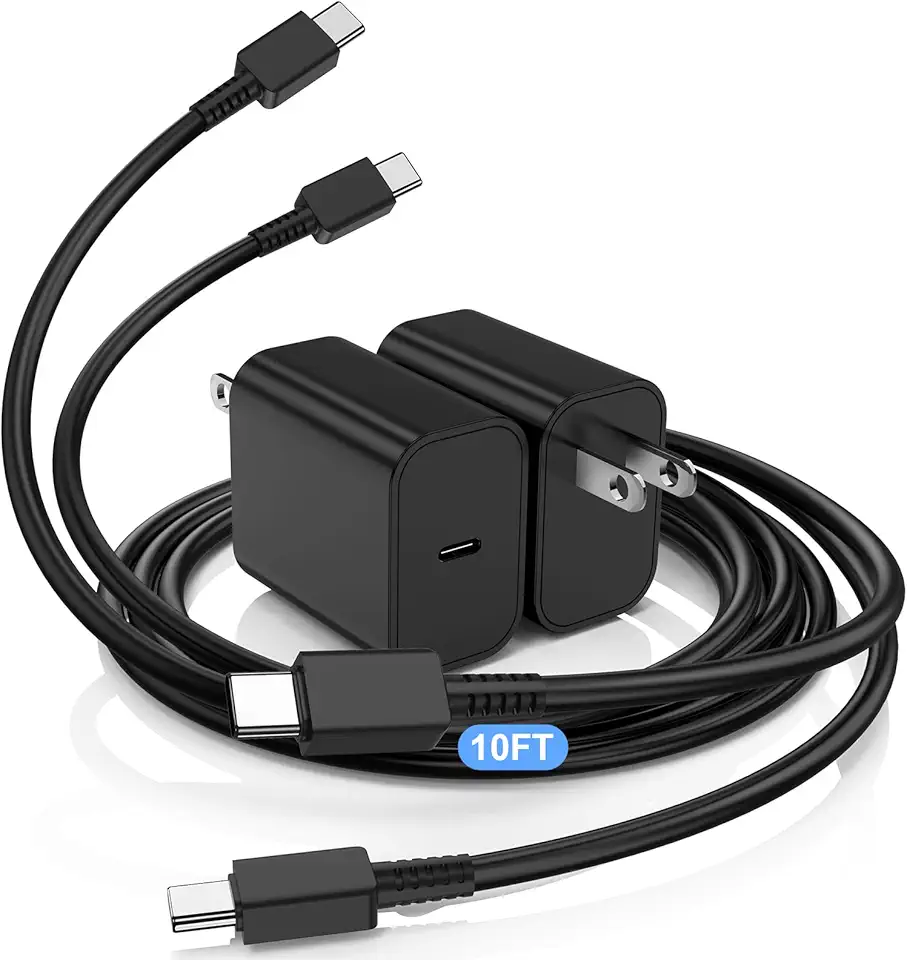
45W Super Fast Charger USBC Charger, 2Pack 10FT Samsung Charger Fast Charging Cord Cable& Samsung Type C Charger Block for Galaxy S25 S24 S23 S22 S21 Ultra/Plus, Tab S10 S9 S8 S7,iPad,Android Phone

CHARM FOCUS Stereo Headset Adapter, Audio Mic Headphone Adapter for Xbox One, Xbox Series X|S and Elite Controller, Adjust Audio Balance (Game Sound & Voice Chat), Not Bluetooth Compatible

Monster Mission 200 Bluetooth Headphones, Wireless Headphones with 3 EQ Modes, Low Latency HiFi Stereo Foldable Lightweight Headset, 60H Playtime,Deep Bass for Home Office Cellphone PC Ect(White)

Monster Mission 200 Bluetooth Headphones, Wireless Headphones with 3 EQ Modes, Low Latency HiFi Stereo Foldable Lightweight Headset, 60H Playtime,Deep Bass for Home Office Cellphone PC Ect

Mind Reader Monitor Stand, Height Adjustable, Ventilated Laptop Riser, Office, Metal, 36.8L x 23.5W x 14H cm, Black

Laptop Stand for Desk, Adjustable Laptop Riser ABS+Silicone Foldable Portable Laptop Holder, Ventilated Cooling Notebook Stand for 10-15.6” Laptops,Tablet-Black

ZSCMALLS Portable Monitor, 15.6" FHD 1080P IPS Laptop Screen Extender with Adjustable Stand, USB-C HDMI Portable Screen, Portable Monitor for Laptop Mac PC Phone Xbox PS4/5 Switch
