Proxmox 8 Cluster with Ceph Storage configuration

About
No channel description available.




Video Description
Are you looking to setup a server cluster in your home lab? Proxmox is a great option along with Ceph storage. In this video we take a deep dive into Proxmox clustering and how to configure a 3-node Proxmox server cluster with Ceph shared storage, along with Ceph OSDs, Monitors, and Ceph storage Pool. In the end I test a migration of a Windows Server 2022 virtual machine between Proxmox nodes using the shared Ceph storage. Cool stuff. 3 Proxmox Builds below: Minisforum BD795M – https://geni.us/bd795m RackChoice 2U Micro ATX Compact – https://geni.us/rackchoice2u Cooler Master MWE Gold 850 V2 – https://geni.us/coolermaster850 Crucial 128 GB 5600MT/sec RAM – https://geni.us/crucial128gbramkit Noctua NH-L9i-17xx, Premium Low-Profile CPU Cooler – https://amzn.to/4hAKIwG Crucial 96GB kit of DDR5 SODIMM memory kit – https://geni.us/noctuanhl9i17xx Intel X520-DA2 10 GbE network adapter – https://geni.us/intelx520 Kingston 240 GB drive for boot – https://geni.us/kingston240 Samsung EVO 990 Pro 2TB – https://geni.us/samsung990pro2tb MX-4 Thermal paste – https://geni.us/mx4thermalpaste Case fans: https://geni.us/arcticp8 BD795i SE: Minisforum BD795i SE mini-ITX motherboard – https://geni.us/minisforumbd795ise RackChoice 2U Micro ATX Compact Rackmount – https://geni.us/rackchoice2u Coolermaster MWE Gold 850 – https://geni.us/coolermaster850 Crucial 128 GB 5600MT/sec RAM – https://geni.us/crucial128gbramkit Kingston 240 GB drive for boot – https://geni.us/kingston240 Intel X520-DA2 10 GbE network adapter – https://geni.us/intelx520 Samsung EVO 990 Pro 2TB – https://geni.us/samsung990pro2tb Artic P12 slim fan – https://geni.us/arcticp8 BD790i X3D: Thermaltake Tower 200: https://geni.us/thermaltaketower200 Minisforum BD790i X3D: https://geni.us/minisforumbd790ix3d Cooler Master MWE Gold 850 V2 – https://geni.us/coolermaster850 Crucial 128 GB 5600MT/sec RAM – https://geni.us/crucial128gbramkit Artic P12 slim fan – https://geni.us/arcticp8 https://geni.us/asusgeforcertx5070 Predator 1TB boot drive: https://geni.us/predatorssd1tb Samsung 990 Pro 4TB VM storage: https://geni.us/samsungpro9904tb ★ Subscribe to the channel: https://www.youtube.com/channel/UCrxcWtpd1IGHG9RbD_9380A?sub_confirmation=1 ★ My blog: https://www.virtualizationhowto.com ★ Twitter: https://twitter.com/vspinmaster ★ LinkedIn: https://www.linkedin.com/in/brandon-lee-vht/ ★ Github: https://github.com/brandonleegit ★ Facebook: https://www.facebook.com/people/VirtualizationHowto/100092747277326/ ★ Discord: https://discord.gg/Zb46NV6mB3 Introduction to running a Proxmox server cluster - 0:00 Talking about Promox, open-source hypervisors, etc - 0:48 Thinking about high-availability requires thinking about storage - 1:20 Overview of creating a Proxmox 8 cluster and Ceph - 2:10 Beginning the process to configure a Proxmox 8 cluster - 2:24 Looking at the create cluster operation - 3:03 Kicking off the cluster creation process - 3:25 Join information to use with the member nodes to join the cluster - 3:55 Joining the cluster on another node and entering the root password - 4:15 Joining the 3rd node to the Proxmox 8 cluster - 5:13 Refreshing the browser and checking that we can see all the Proxmox nodes - 5:40 Overview of Ceph - 6:11 Distributed file system and sharing storage between the logical storage volume - 6:30 Beginning the installation of Ceph on the Proxmox nodes - 6:52 Changing the repository to the no subscription model - 7:30 Verify the installation of Ceph - 7:51 Selecting the IP subnet available under Public network and Cluster network - 8:06 Looking at the replicas configuration - 8:35 Installation is successful and looking at the checklist to install Ceph on other nodes - 8:50 The Ceph Object Storage Daemon (OSD) - 9:27 Creating the OSD and designating the disk in our Proxmox hosts for Ceph - 9:50 Selecting the disk for the OSD - 10:15 Creating OSD on node 2 - 10:40 Creating OSD on node 3 - 11:00 Looking at the Ceph dashboard and health status - 11:25 Creating the Ceph pool - 11:35 All Proxmox nodes display the Ceph pool - 12:00 Ceph Monitor overview - 12:22 Beginning the process to create additional monitors - 13:00 Setting up the test for live migration using Ceph storage - 13:30 Beginning a continuous ping - 14:00 The VM is on the Ceph storage pool - 14:25 Kicking off the migration - 14:35 Only the memory map is copied between the two Proxmox hosts - 14:45 Distributed shared storage is working between the nodes - 15:08 Nested configuration in my lab but still works great - 15:35 Concluding thoughts on Proxmox clustering in Proxmox 8 and Ceph for shared storage - 15:49













Upgrade Your Gear
AI-recommended products based on this video

6-Pack + 1 Base Magnetic and Adhesive Cable Organizer - 8mm Slot for Phone, USB, HDMI, and Power Cords. Cable Clips Suitable for use on Office desks, Home Tables, nightstands, and in Cars (White).

Nylon Universal Cable Tie Buckle, Heavy Duty Self-Locking Nylon Zip Ties with Pin & Button Design,UV Resistant Cable Clips Tool Fasteners Car Body,Suitable for Car Daily Repair (50)

Nylon Universal Cable Tie Buckle,100pcs Heavy Duty Self-Locking Nylon Zip Ties Holder,Multipurpose Plastic Cable Ties Tool for Car Daily Repair, UV Resistant Black Zipties Bumper Retainer Clips
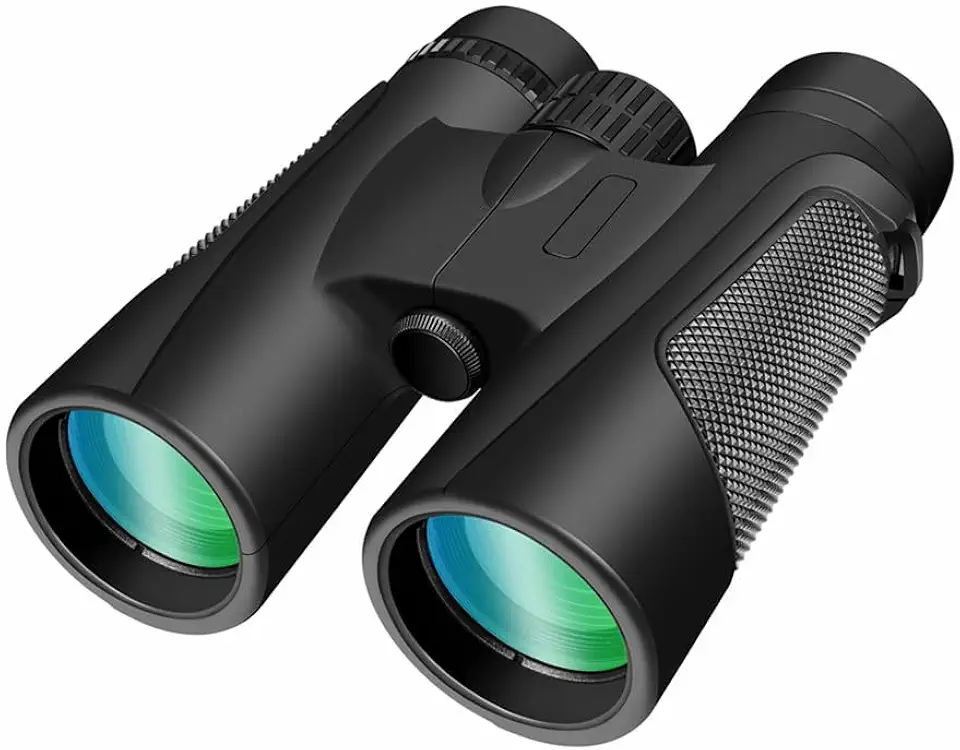
High Power 25X60 Binoculars for Adults Waterproof 60mm Big Eyepiece Fogproof Binoculars with BAK4 Prism FMC Lens for Outdoor Stargazing Hunting Sports Concerts Traveling Wildlife Bird Watching(25X60)

ESR Camera Lens Protector for iPhone 16/16 Plus, Tough HD Individual Protectors, Scratch Resistant, Ultra-thin Tempered Glass, Armorite Series, 1 Pack, Clear

Safety 1st Clear View Baby Nail Clippers, Grey – 5X Magnifying Lens and Easy-Grip Handle, Compact for Diaper Bag Essentials
![[2+2 Pack] UniqueMe Screen Protector for Samsung Galaxy S25 with Camera Lens Protector, Anti-Scratch, Fingerprint ID Compatible, HD Clear Tempered Film, Easy to Install, Bubble Free, Case Friendly](https://m.media-amazon.com/images/I/71zjt8qClbL._AC_UL960_FMwebp_QL65_.jpg)