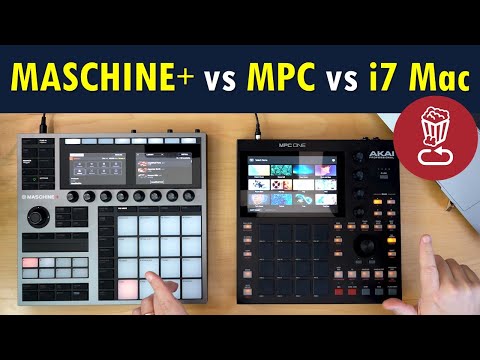
Review: Maschine+ Plus vs Akai MPC vs i7 MacBook Pro: 400+ questions answered...

loopop
@loopopAbout
Loopop is all about in-depth electronic music & synth ideas tips, tricks and reviews!


Video Description
Keep asking questions in the comment section! See below for follow ups. If you like the insights in this video, there's plenty more in my ever-expanding book of electronic music ideas, tips and tricks here: ► Patreon: https://patreon.com/loopop Check prices here (affiliate links help the channel - thanks!): ► Maschine+ on Sweetwater: https://imp.i114863.net/J3GD7 ► Maschine Plus on Amazon: https://amzn.to/2FXh4G6 ► Maschine Plus on Thomann: https://www.thomann.de/intl/search_dir.html?sw=maschine+plus&offid=1&affid=369 ► MPC One on Sweetwater: https://imp.i114863.net/XPbJb ► MPC One on Amazon: https://amzn.to/3347vO9 ► MPC One on Thomann: https://www.thomann.de/intl/akai_mpc_one.htm?offid=1&affid=369 Here's my video on morphing MIDI instruments using the Lock feature: ► https://www.youtube.com/watch?v=QPFj8Tdt1EI Here's my comparison between Akai's MPC One, Live and Live II ► https://www.youtube.com/watch?v=eRJ4EhxO_D4 For those asking about WaveSkimmer: ► https://www.modwheel.co.nz/waveskimmer For those asking how to get Reaktor ensembles on MAS+: 1. Make sure you set the Meta Info to Instrument as I show in the video! 2. At the top menu: File - Save As to save the ensemble somewhere 3. Move the .ENS file to the SD Card in this path: Native Instruments - Maschine 2 - Sounds For those asking how to create and then get Kontakt NKI's on MAS+: 1. Open up Kontakt, and make a new instrument 2. Add your samples in the Mapping Editor 3. Open up to Kontakt Browser and go to the Automation tab 4. Select Host Automation (not the MIDI tab!) 5. Grab any of the available slots and drag them onto a parameter you want to control 6. Make sure you save the NKI files as "Patch + Samples" 7. Copy the .NKI file and samples folder to the SD Card in this path: Native Instruments - Maschine 2 - Sounds. I saved the .NKI in the Sounds folder, and the folder with the samples goes in the same Sounds folder (so, basically the samples live in a sub folder, inside the sounds folder) Other places I hang out: ► Instagram: https://www.instagram.com/loopopmusic ► Facebook: https://www.facebook.com/loopopmusic ► Twitter: http://www.twitter.com/loopopmusic ► Web: https://loopopmusic.com My music: ► Bandcamp: https://loopop.bandcamp.com ► Spotify: http://bit.ly/LoopopOnSpotify ► Apple Music:http://bit.ly/LoopopOnAppleMusic ANSWERS TO QUESTIONS I GOT ASKED AFTER MAKING THE VIDEO: - The internal sample rate is 44.1khz/24 bit, with a sample buffer of 128. I matched the settings on my computer, but increasing the buffer size didn't really improve its performance - Stress testing multiple audio tracks got to 27 simultaneous tracks compared to 80 on my Mac - I'm told you can connect a USB ethernet adapter if you're anti-wifi TIMELINE: 0:00 Intro 0:40 Plus vs MK3 4:20 Plus vs 2.7ghz i7 5:50 CPU: Full songs 12:35 CPU: Samples 13:55 CPU: Drums 15:20 CPU: Plugins 22:35 Plugin params 23:40 Kontakt, Reaktor 25:10 Kontakt .NKI 31:05 Reaktor .ENS 32:25 Plus studio hub 33:50 Ext audio interfaces 35:35 MIDI templates 36:05 Locks 4 ext gear 37:40 PLUS VS MPC 39:00 MPC pros 42:00 Plus pros 48:25 Workflow 52:00 Arranger clips 52:50 Misc differences 53:50 Outro jam Want to email me personally? ► Ziv (at) loopopmusic.com NOTE: Occasionally I’ll try out affiliate marketing and include affiliate links. This means that I may earn a commission when you click on or make purchases via affiliate links. The content of this clip is entirely my opinion, and was not paid for or dictated in any way by the company creating the gear. Without addressing the particulars of products shown here as they might be under NDA, gear shown on this channel may be either sent by the manufacturer, on loan for review or bought at a discount.


Upgrade Your Music Studio
AI-recommended products based on this video

Fanless Mini PC 13th Gen Core i7 1355U(10C/12T), Win11 Pro Mini Desktop PC Dual 2.5G LAN Mini PC Fanless, Iris Xe Graphics, Dual HD+ DP Triple Display, USB-C, WiFi6, BT5.2, 64GB RAM 1TB NVME SSD

WEIDIAN Mini PC Fanless Industrial Win 11 Pro PC Core i7 10810U 64GB RAM 1TB SSD Mini Desktop Computer GPIO, 4K 2HD+DP, 2LAN, 2COM RS232/422/485, 6USB WiFi&BT RAID Wake On LAN Auto Power On

msi Crosshair 16 Gaming Laptop - with 2024 Office Lifetime License, GeForce RTX 4070, 16" FHD+ 144 Hz Display, 14th Gen Intel 16-Core i7 14650HX, Backlit KB, Windows 11 Pro (32GB DDR5 RAM | 1TB SSD)

HAJAAN CYCLONIA Liquid Cool Gaming PC | Intel i7 11700F 8-Core Processor Upto 4.9 GHz | GeForce RTX 3050 8GB GDDR6 | 32GB DDR4 RAM | 1TB SSD | 4TB HDD | WiFi Ready | Windows 11 Pro | Black

FYOUNG Controller Keyboard for Xbox Series X/S/Xbox One/S/Controller Gamepad, 2.4Ghz Mini QWERTY Controller Keyboard Gaming Chatpad with Audio/Headset Jack for Xbox Series X/S Controller Accessories
