Unlocking Hidden Secrets: Explore the Untapped Roku Menus You Never Knew Existed!


Triple M
@triple_mAbout
Thank you for stopping by the channel where we do everything Tech. Please Subscribe while you're here. Thanks!!



Video Description
Roku has some secret menus that Allows you to change a lot of settings 👉🏿IPVANISH VPN DEALS - https://affiliate.ipvanish.com/SH18 👉🏿NORD VPN DEAL– https://nordvpn.com/TripleM RELATED VIDEOS 👉🏿Threat protection for firestick - https://youtu.be/CwUZS_GV1SQ 👉🏿Scan Your Firestick For Virus - https://youtu.be/jVS4wpdeqsM 👉🏿Jailbreak/Unlock Firestick - https://youtu.be/iylqXEo3uxA 👉🏿Disable These Firestick Apps - https://youtu.be/ARaqdnYYZSU ==================================================================== Check out my Amazon Store for more Gadgets: www.amazon.com/shop/influencer-f3534698 ==================================================================== Join this channel to get access to perks: https://www.youtube.com/channel/UCfiZzwbPTOw8MCQfyxES43A/join ==================================================================== To access the Wireless secret menu: 1. Press Home five times. 2. Press Up, Down, Up, Down, Up. The Wi-Fi menu should open. To access the Images and Ads menu: 1. Press Home five times. 2. Press Up, Right, Down, Left, Up. The Images and Ads secret menu should open. To access the Update and Reset secret menu: 1. Press Home five times. 2. Immediately press Fast Forward three times. 3. Press Rewind twice. The Update and Reset secret menu should open. To access the Platform secret menu: 1. Press Home five times. 2. Press Fast Forward, Pause, Rewind, Pause, Fast Forward. The Platform secret menu should open. To access the Channel Info secret menu: 1. Press Home three times. 2. Immediately press Up twice. 3. Press Left, Right, Left, Right, Left. The Channel Info menu should open. To access the HDMI secret menu: 1. Press Home five times. 2. Immediately press Down, then Left. 3. Press Up three times. The HDMI secret menu should open. To access the Developer secret menu: 1. Press Home three times. 2. Immediately press Up twice. 3. Press Right, Left, Right, Left, Right. The Developer secret menu should open. How to Access the Reboot Secret Menu This isn’t really a menu at all. It’s simply a code that will reboot your Roku device. Once you enter it, your Roku will no longer respond to the remote until it has completely rebooted. To reboot your Roku device: 1. Press Home five times. 2. Press Up, Rewind, Rewind, Fast Forward, Fast Forward. Your Roku will seem to freeze and won’t respond to the remote. After a short while, your Roku will reboot. ==================================================================== FOR BUSINESS INQUIRIES ==================================================================== Email: [email protected] Instagram: https://www.instagram.com/triplem3/ Twitter: https://twitter.com/TripleMPC Follow me on Facebook: https://www.facebook.com/TripleMPC ==================================================================== #roku #secrets #codes #menus



Essential DJI Mini 3 Pro Accessories
AI-recommended products based on this video
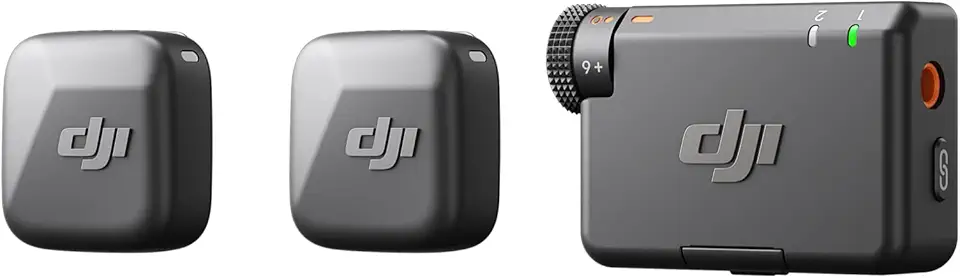
DJI Mic Mini (2 TX + 1 RX), Detail-Rich Audio, Wireless Lavalier Microphone for Camera/Android, 2-Person Vlog, Team Production
DJI Mic Mini (2 TX + 1 RX), Detail-Rich Audio, Wireless Lavalier Microphone for Camera/Android, 2-Person Vlog, Team Production
DJI Mic Mini (2 TX + 1 RX), Detail-Rich Audio, Wireless Lavalier Microphone for Camera/Android, 2-Person Vlog, Team Production
DJI Mic Mini (2 TX + 1 RX), Detail-Rich Audio, Wireless Lavalier Microphone for Camera/Android, 2-Person Vlog, Team Production

SanDisk 128GB Extreme PRO SDXC UHS-I Memory Card - C10, U3, V30, 4K UHD, SD Card - SDSDXXD-128G-GN4IN
DJI Mic Mini (2 TX + 1 RX), Detail-Rich Audio, Wireless Lavalier Microphone for Camera/Android, 2-Person Vlog, Team Production
DJI Mic Mini (2 TX + 1 RX), Detail-Rich Audio, Wireless Lavalier Microphone for Camera/Android, 2-Person Vlog, Team Production
DJI Mic Mini (2 TX + 1 RX), Detail-Rich Audio, Wireless Lavalier Microphone for Camera/Android, 2-Person Vlog, Team Production