How to Use Microsoft Copilot in PowerPoint & Save Time!


Scott Brant
@your365coachAbout
I’ll help you achieve more, with the tools you already have.
Latest Posts


Video Description
In today's game-changing tutorial, we're diving into PowerPoint with the new Microsoft 365 Copilot. Say hello to a new era of presentation creation, where your ideas are seamlessly transformed into stunning slides. With Copilot by your side, watch as we dramatically reduce the time and effort needed to create impactful PowerPoint presentations from scratch, from existing Word documents, and even summarising complex slides into concise content. 🔍 What You'll Learn: Seamless Integration: Discover how Copilot integrates with PowerPoint to transform your Word documents into visually compelling presentations. Effortless Creation: Master the art of creating PowerPoint slides from scratch with Copilot’s intuitive guidance. Smart Summarisation: Learn the secrets to summarising detailed presentations into focused slides that capture your audience's attention. Time-Saving Techniques: Uncover Copilot's potential to save you hours, allowing you to focus on what truly matters in your work. ⭐️ Additional Resources: 📚 Grab your Free Microsoft 365 eBook: www.your365coach.co.uk/ebook 🔗 Elevate your Microsoft 365 skills: www.your365coach.co.uk/courses 🔎 Learn more about Your 365 Coach: www.your365coach.co.uk 🔥 Ready to transform your PowerPoint presentations with the power of Copilot? Hit like, subscribe, and turn on notifications for our channel to keep up with the latest Microsoft 365 tips and tricks from Your 365 Coach! 📰 Stay Connected: Instagram: @your365coach TikTok: @your365coach 🕒 Video Timings: 00:00 Introduction 01:18 How to Create PowerPoint Presentations from Word Documents with Copilot 05:15 Summarise PowerPoint Presentations for Decision Makers with Copilot 08:13 Create New PowerPoint Presentations with Copilot 09:59 Summary #PowerPoint #Microsoft365 #Copilot #Your365Coach
You May Also Like










Essential Drones for Every Budget
AI-recommended products based on this video

SmallRig ZV-E1 Camera Baseplate for Sony ZV-E1, Built-in Cold Shoe Mount and QR Plate (for Arca) Quick Switch Between Tripod and Stabilizer for DJI RS 2 / RSC 2 / RS 3 / RS 3 Pro - 4314

NEEWER a6700 L Plate Compatible with Sony Alpha 6700, Quick Switch Aluminum Extendable Side Plate & Anti Twist Baseplate Compatible with Arca Swiss QR System DJI RS 2 RSC 2 RS 3 Pro Gimbals, CA048

SmallRig Baseplate for Sony Alpha 6700, Bottom Mount Plate Built-in Quick Release Plate for Arca, Supporting Quick Switch Between Tripod and Stabilizer (for DJI RS 2 / RSC 2 / RS 3 / RS 3 Pro) - 4338
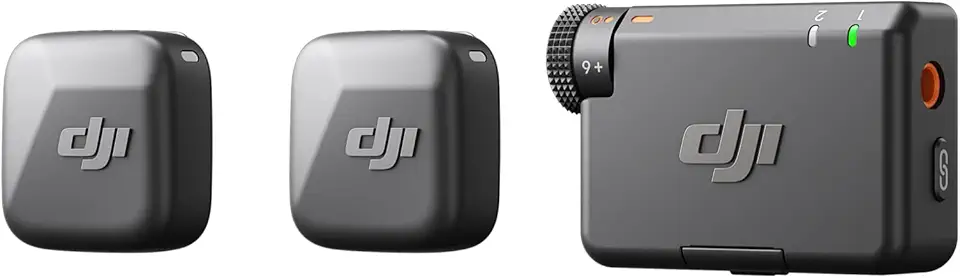
DJI Mic Mini (2 TX + 1 RX), Detail-Rich Audio, Wireless Lavalier Microphone for Camera/Android, 2-Person Vlog, Team Production

SanDisk 64GB Extreme PRO SDXC UHS-I Memory Card - C10, U3, V30, 4K UHD, SD Card - SDSDXXU-064G-GN4IN
